solution
How to Share Accounts Without Sharing Passwords (Secure Guide)
Master how to share accounts without sharing passwords. Learn how to share passwords securely and share accounts safely using managed browser profiles for Google Ads, Facebook, Amazon and more.
Jul 22, 2026Carlos Rivera
In today’s collaborative work environment, knowing how to share accounts without sharing passwords is critical for marketing teams, e-commerce businesses, and remote operations. Whether managing Google Ads, Facebook Business, Instagram, Amazon Seller Central, TikTok, or ChatGPT — teams need reliable solutions for how to share accounts safely.
Traditional password sharing through chat tools is no longer acceptable. This guide will show you how to share passwords securely (or better yet, avoid sharing them entirely) using modern, controlled access methods.
Why Teams Need Better Ways to Share Accounts?
Account sharing has become standard practice, but the risks of the old “send the password” method continue to grow:
- Passwords leak across personal devices and unsecured channels
- Former employees retain access indefinitely
- Cookies and authenticated sessions can be stolen or reused
- Lack of visibility and audit trails
- Increased chance of account bans or security breaches
As teams scale, simply learning how to share passwords securely is no longer enough. Organizations need a fundamentally safer approach to share accounts safely.
What Modern Secure Account Sharing Looks Like?
The smartest teams have shifted their mindset from “how to share accounts without sharing passwords” to “how to grant access without exposing credentials.”
Instead of sending usernames and passwords, administrators create pre-authenticated managed browser profiles. Team members launch these profiles and work normally, while passwords, cookies, fingerprints, and session data remain under centralized control.
This method solves both security and productivity challenges at once.
Best Practices for How to Share Accounts Safely
Here are proven strategies to share accounts without sharing passwords effectively:
- Use dedicated browser profiles instead of personal browsers
- Prioritize access sharing over password sharing
- Apply role-based permissions (least privilege)
- Protect cookies, extensions, and browser settings
- Enable full activity logging and audit trails
- Standardize security policies across the team
Implementing these practices helps teams master how to share passwords securely while significantly reducing risk.
How Nstbrowser Makes It Easy to Share Accounts Without Sharing Passwords
Nstbrowser is a professional anti-detect browser platform specifically built to help teams share accounts safely and share accounts without sharing passwords.
Unlike traditional password sharing methods, Nstbrowser allows organizations to create, manage, and securely distribute isolated browser environments. Administrators can prepare complete working profiles — including unique browser fingerprints, authenticated cookies, proxies, extensions, and custom security policies — and then assign them to team members without ever exposing sensitive credentials.
Core Features of Nstbrowser
- Centralized Team Workspace: Manage all team members, browser profiles, proxies, extensions, and permissions from a single dashboard.
- Unlimited Browser Profiles: Create dedicated, isolated profiles for each platform (Google Ads, Facebook Ads Manager, Amazon Seller Central, TikTok Business, Claude, ChatGPT, etc.). Each profile has its own unique browser fingerprint, cookies, and proxy configuration.
- Granular Role-Based Permissions: Assign different access levels — operators can only launch profiles, managers can assign profiles and view logs, administrators have full control. You can even restrict cookie export, password viewing, DevTools access, and extension management.
- Advanced Browser Security Policies: Automatically disable password saving prompts, hide sensitive settings, block unauthorized websites, restrict Chrome Web Store, and prevent Developer Tools access.
- Cookie & Session Protection: Cookies remain protected under organizational control.
- Detailed Audit Logs: Track exactly who launched which profile, when, and what actions were performed.
- Proxy & Fingerprint Management: Built-in proxy support with advanced fingerprint randomization.
How It Works
Nstbrowser combines browser profiles, team management, permissions, and browser security policies into a single workspace, allowing organizations to share accounts without exposing sensitive assets.
Rather than sending usernames and passwords between team members, administrators can prepare secure browser environments and assign access based on each person's role.
Here's how a typical workflow looks.
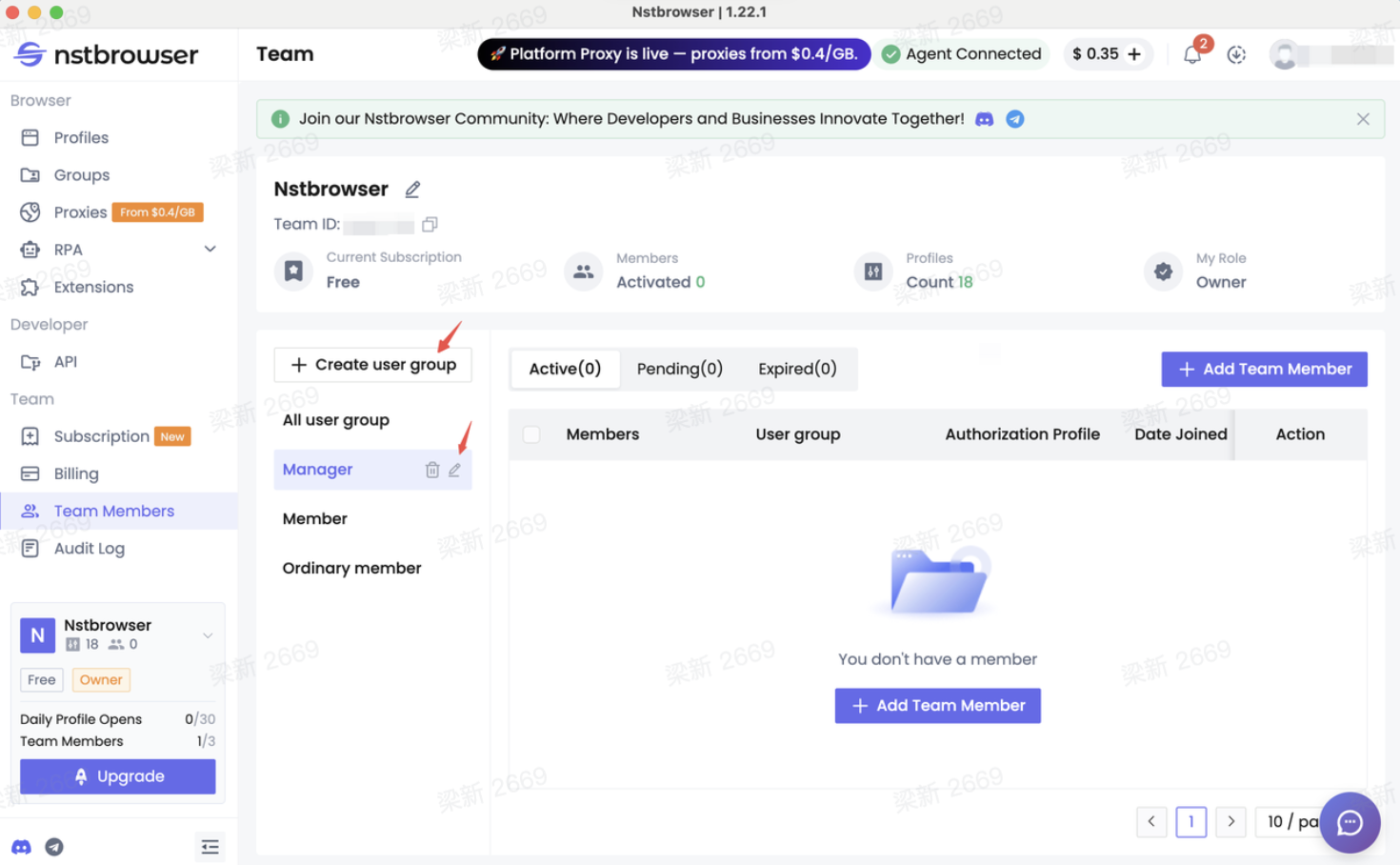
1. Creating an Account and Setting Up Your Team
First, the administrator needs to register and log in to Nstbrowser. Then first creates a team and invites members into a shared workspace.
Instead of managing accounts individually, administrators can centrally manage:
- Team Members
- Browser Profiles
- Profile Groups
- Proxies
- Extensions
- Cookies
- Account Permissions
- Group-level Security Settings
This keeps account assets under organizational control rather than individual ownership.
2. Configure User Group Permissions
Different roles often require different permissions.
Example User Groups:
- Member: Allowed only to launch and use assigned Profiles
- Manager: Can manage selected Profiles and team members
- Temporary Member: Limited access to a small number of designated environments
Note: Cookie management permissions can also be restricted so users cannot export authenticated sessions.
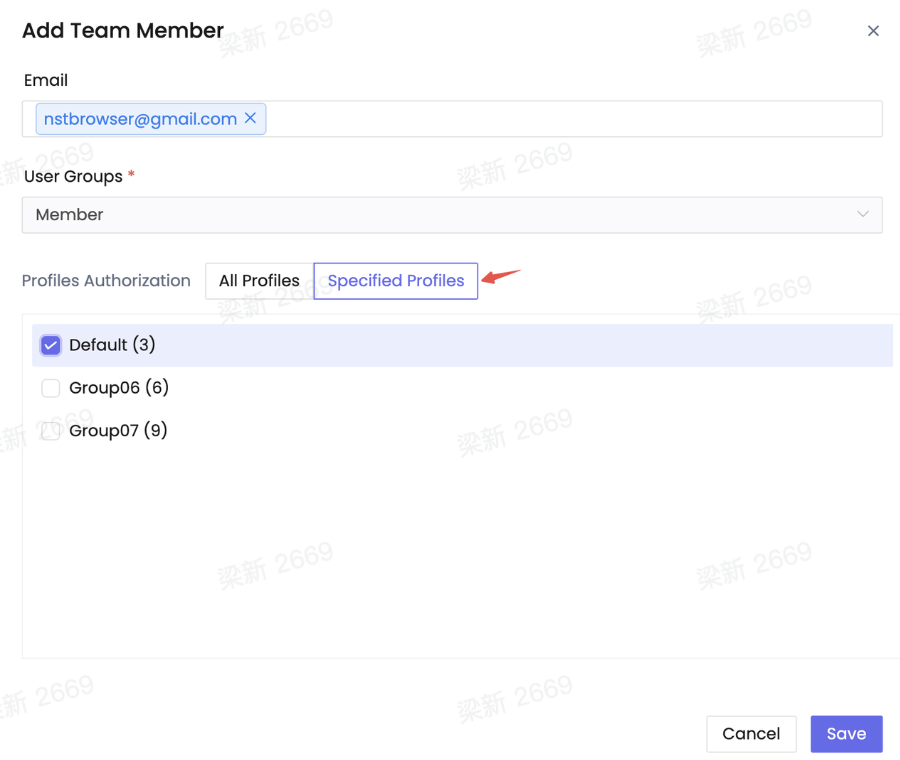
3. Assign Browser Profiles
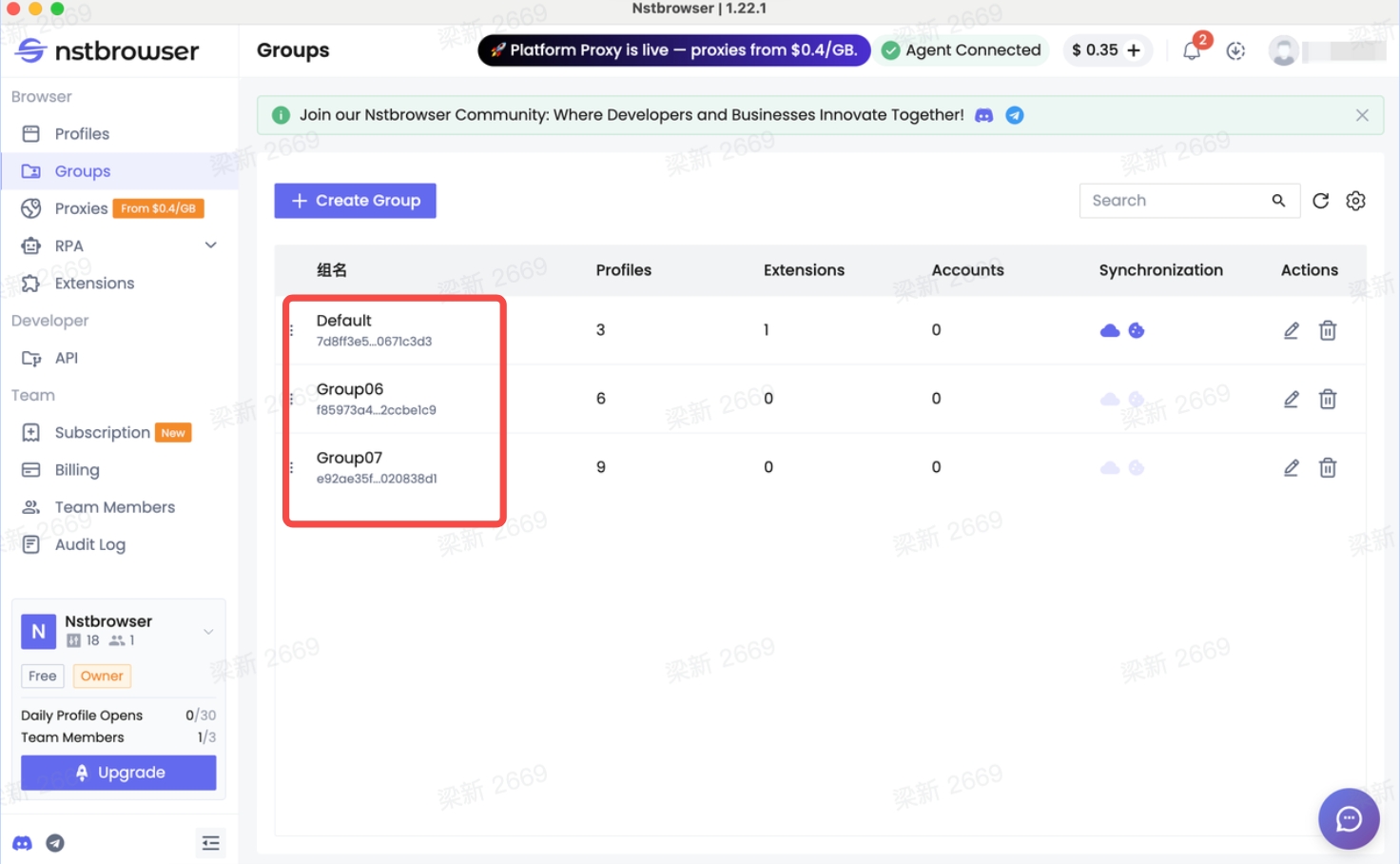
Instead of sharing login credentials, administrators create browser profiles for each business account.
For example:
- Facebook Ads
- Google Ads
- TikTok
Each profile contains its own browser fingerprint, cookies, proxy configuration, and extensions. Employees simply launch the assigned profile and begin working.
4. Apply Browser Security Policies
One of the biggest advantages of Nstbrowser is that browser behavior itself can be restricted.
Administrators can configure policies such as:
1. Prevent viewing saved passwords: Employees can use websites normally without revealing the underlying password.
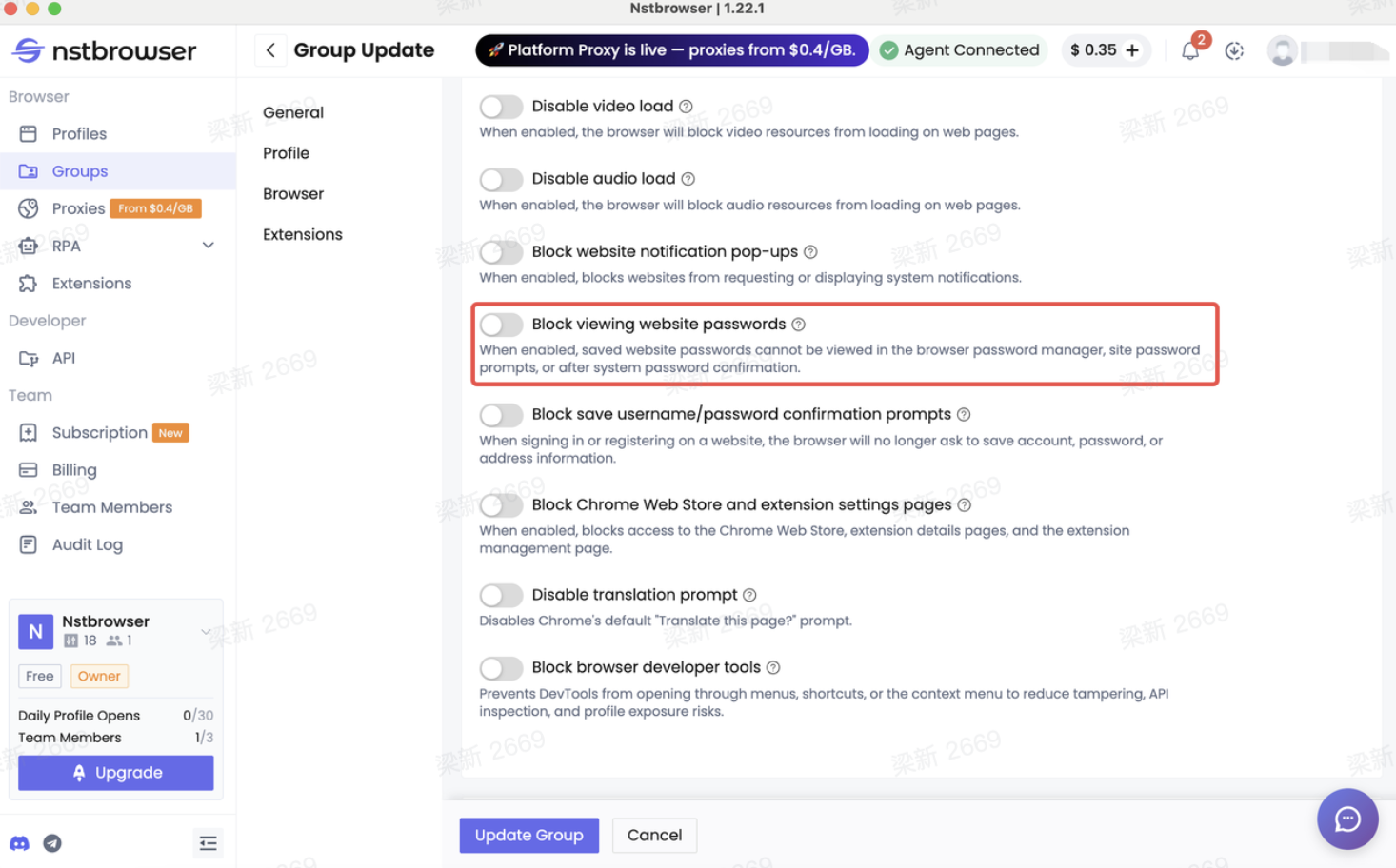
2. Disable password saving: Browsers no longer prompt users to save usernames or passwords locally.
3. Restrict website access: Administrators can allow only approved websites, block specific websites, prevent access to security pages. This reduces accidental account changes and unauthorized browsing.
322af9b93b692dc19ba8f359d886f670.png)
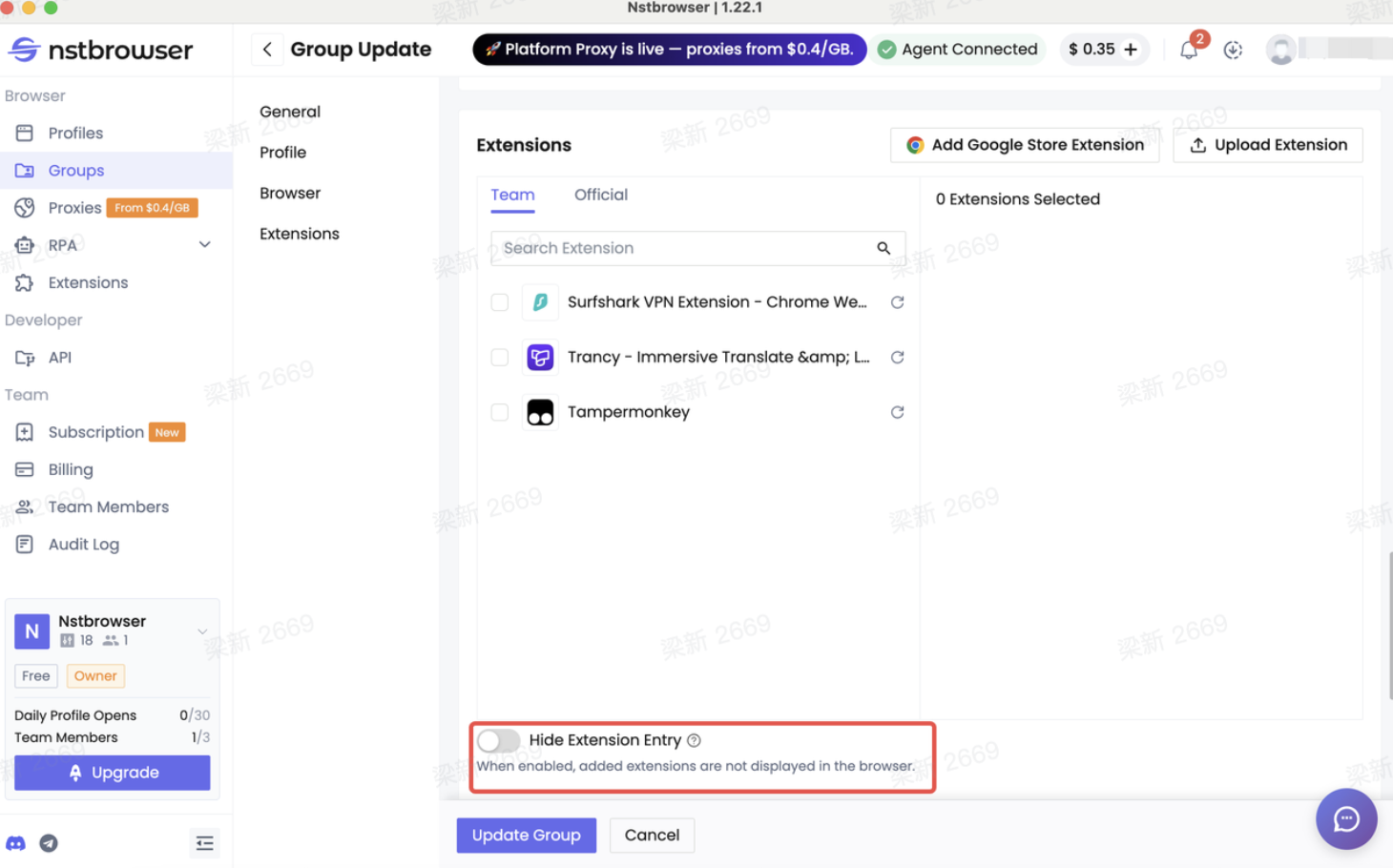
4. Hide browser extensions: Installed extensions continue working, but users cannot easily inspect or manage them.
5. Block Chrome Web Store: Prevent employees from installing unknown extensions that could compromise security.
6. Disable Developer Tools: Users cannot inspect browser storage, cookies, or network requests through DevTools.
7. Restrict CDP Automation: Browser automation through Chrome DevTools Protocol can be limited, helping reduce the risk of unauthorized automated operations.
5: Monitor Activity with Audit Logs
Every organization eventually needs to answer questions like:
- Who opened this account?
- Who modified this profile?
- Who changed the proxy?
- Who performed this operation?
Audit logs provide visibility into important activities, helping administrators investigate issues and maintain accountability across the team.
Frequently Asked Questions
Q1. Is it really possible to share accounts without sharing passwords?
Yes. Tools like Nstbrowser allow teams to share accounts safely through pre-authenticated browser profiles.
Q2. Is there a secure way for how to share passwords securely?
While some basic precautions help, the safest long-term solution is to avoid sharing passwords altogether by using managed access.
Q3. What is the best way to share accounts safely for growing teams?
The best approach combines dedicated browser profiles, role-based permissions, strong security policies, and audit logging.
Q4. Can employees work normally without knowing the account password?
Absolutely. Once the profile is prepared, they can log in and operate as usual without seeing or storing credentials.
Conclusion
Mastering how to share accounts without sharing passwords is one of the most important security upgrades modern teams can make. By adopting managed browser profiles and tools like Nstbrowser, you can share accounts safely, reduce risk, improve compliance, and simplify team collaboration.
Stop relying on risky password sharing. Move to controlled, auditable access that protects your business accounts while keeping your team productive.
Ready to upgrade how your team shares accounts?
Try Nstbrowser today and experience the most secure way to manage shared business accounts.
More