Multi-accounting
How to Safely Share Team Accounts: Use Nstbrowser Profile to Avoid Multi-Device Risk
Multiple team members sharing the same international tool account? Learn how to use Nstbrowser shared Profiles + fixed ISP proxies to maintain one stable browser environment and reduce multi-device risk checks. Best practices for team collaboration without triggering account restrictions.
Jul 08, 2026Carlos Rivera
TL;DR
When multiple team members need to access the same international tool account, directly sharing passwords often triggers multi-device risk checks. The platform sees logins from different devices, IPs, and browsers.
A safer and more professional solution is to have an administrator create a shared Nstbrowser Profile, configure a stable proxy, log into the account, and then grant team members access to that Profile. This way, everyone uses the same browser environment, same fixed IP, and same session, significantly reducing risk while maintaining good user experience.
Many teams purchase shared international tool accounts — such as AI writing tools, SaaS platforms, advertising dashboards, data analytics tools, or e-commerce management systems — but need multiple people to use them simultaneously or in shifts.
The most common (but risky) method is simply sharing the username and password. While convenient at first, this approach often leads to problems. The platform detects the same account logging in from multiple devices, different IP addresses, varying regions, and inconsistent browser environments.
This behavior can easily trigger security alerts, additional verifications, login restrictions, or even account suspension.
The smarter approach is to create one stable, shared browser environment using Nstbrowser. The platform then sees consistent signals, while team members enjoy smooth local access.
Important Note: Always respect the target platform’s terms of service. If shared accounts are prohibited, use the platform’s official team or enterprise plan instead.
Recommended Access Methods at a Glance
| Access Method | Advantages | Main Risks | Best For |
|---|---|---|---|
| Direct password sharing | Fast setup | High multi-device & IP risk | Temporary, low-value accounts |
| Remote desktop | Consistent device environment | Poor speed and collaboration | Occasional use |
| Nstbrowser Shared Profile | Good UX + strong environment control | Requires initial setup | Long-term team collaboration |
| Official team/enterprise plan | Fully compliant | Higher cost | High-value accounts |
1. Why Shared International Tool Accounts Often Trigger Risk Checks
After buying a paid tool account, teams usually need several members to access it:
- Operations team sharing ad analytics tools
- Content team sharing AI generation platforms
- Sales team accessing CRM or SaaS dashboards
- Marketing team using data monitoring tools
- Customer support handling shared work accounts
When each person logs in from their own laptop using their own browser and home/office network, the platform doesn’t see “team collaboration” — it sees one account appearing across many different devices and locations.
Key risk signals include:
- Multiple different device fingerprints
- Varied browser versions and settings
- Different IP addresses and regions
- Inconsistent language and timezone settings
- Frequent login/logout activity
Combined, these signals can make the platform treat the account as compromised or abnormally shared.
2. The Core Problem: Multi-Device Login
The real issue isn’t that multiple people are using the account — it’s that the platform sees multiple devices.
Five team members logging in from five different computers creates five separate environments. The platform has no easy way to know whether this is legitimate teamwork or an account breach.
By contrast, using one shared Nstbrowser Profile creates consistency:
- Same browser fingerprint
- Same cookies and login session
- Same fixed IP address
- Same timezone and language settings
- Continuous stable session
This significantly lowers abnormal behavior flags while still allowing convenient team access.
Remember: Nstbrowser helps manage the browser environment. It is not a tool to bypass platform rules. Always comply with the platform’s terms of service.
3. Step-by-Step: How to Set Up Nstbrowser Profile Sharing
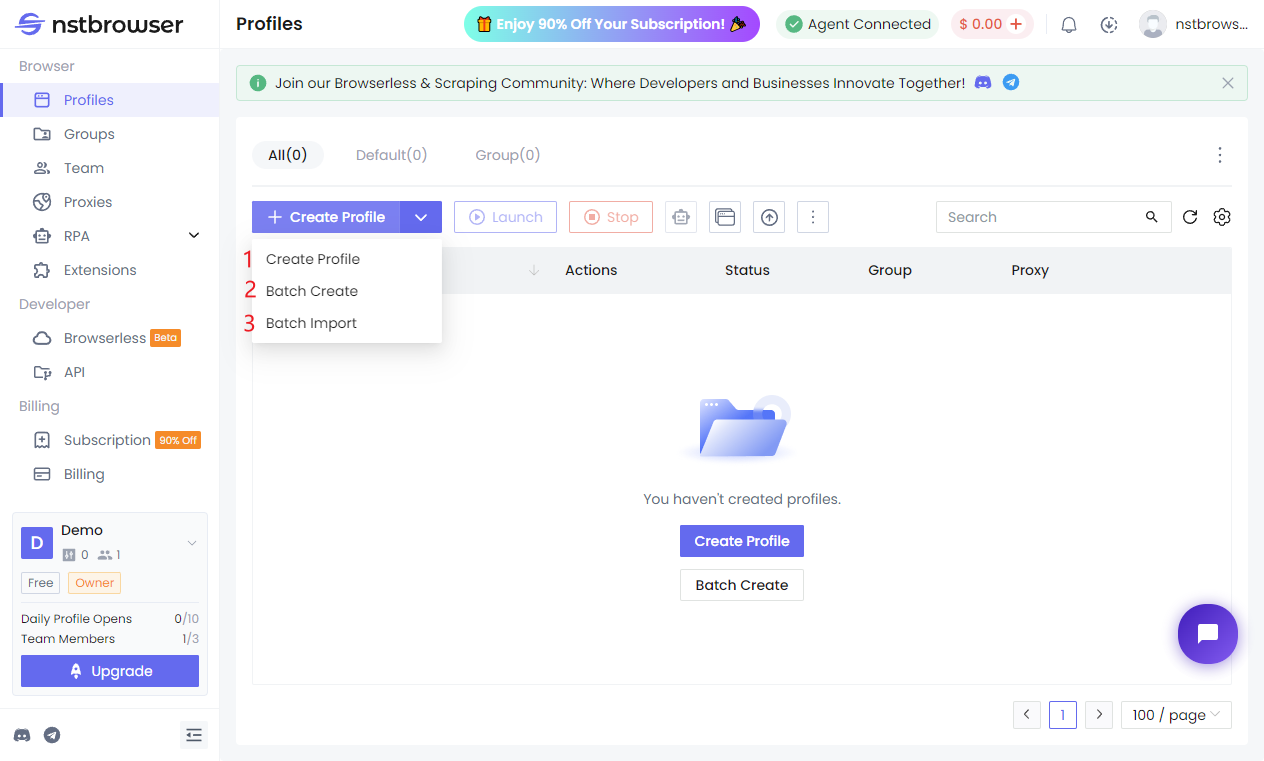
Step 1: Admin Creates a Dedicated Shared Profile
Create a new Profile in Nstbrowser exclusively for the shared account.
Use clear naming such as:
Team-AI-Tool-SharedMarketing-SaaS-ProfileAds-Dashboard-Team
Keep this Profile focused on one tool/account to avoid mixing cookies and data.
Step 2: Configure a Stable Proxy
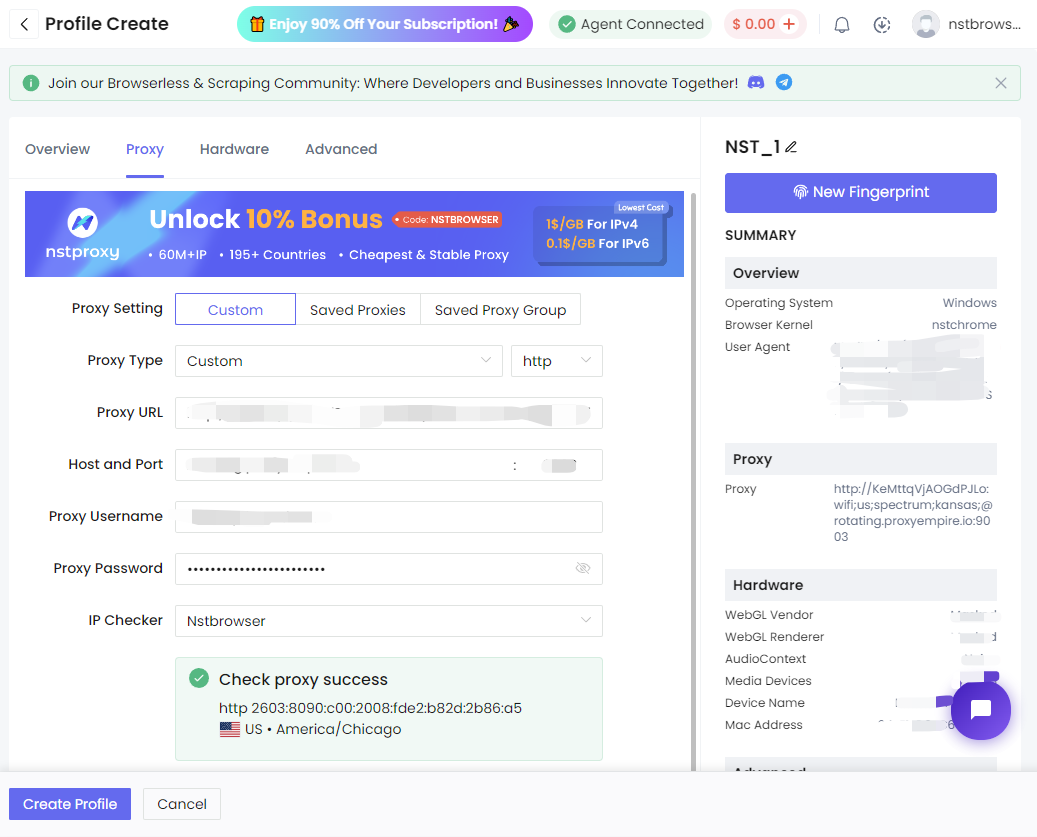
For region-sensitive platforms, bind the Profile to a Nstproxy ISP fixed proxy.
Recommended setup:
One shared team account = One Nstbrowser Profile = One fixed ISP IP
This provides a consistent network identity and greatly reduces IP-related risk signals.
Step 3: Log In to the Account
Open the Profile, log into the target tool, complete any 2FA or verification, and ensure everything works smoothly.
Avoid frequently clearing cookies or changing settings afterward — stability is key.
Step 4: Grant Access to Team Members
Use Nstbrowser’s team permission system to grant access to relevant members.
Team members don’t need the account password — they simply open the shared Profile to work.
Step 5: Team Members Use the Shared Profile
Everyone accesses the tool through the same Profile. The platform sees one unified environment, making the activity look more natural and secure.
4. Comparison: Different Sharing Methods
| Method | User Experience | Environment Consistency | Permission Control | Risk Level | Recommended Scenario |
|---|---|---|---|---|---|
| Password Sharing | Excellent | Poor | Weak | High | Short-term, low-risk tasks |
| Remote Desktop | Poor | High | Medium | Medium | Occasional or specific workflows |
| Nstbrowser Profile | Excellent | High | Strong | Low | Long-term team tool sharing |
| Official Team Plan | Excellent | High | Best | Lowest | When budget allows |
5. Best Practices for Shared Team Profiles
- Avoid simultaneous sensitive operations — Assign one person for payments, settings changes, or exports.
- Regular admin maintenance — Check proxy status, login state, and permissions weekly.
- Match proxy region — Ensure the ISP IP region aligns with the account’s normal usage.
- Keep Profiles focused — Don’t mix unrelated accounts in one shared Profile.
- Prioritize official plans — Use platform-native team features whenever available.
- Document usage rules — Create simple team guidelines for shared Profile usage.
6. When Is Nstbrowser Shared Profile Most Suitable?
- Teams sharing one AI tool account
- Multiple operators using the same ad management dashboard
- Sales or support teams using a shared SaaS platform in shifts
- Content and marketing teams collaborating on the same analytics tool
- E-commerce teams managing a single store backend
These scenarios benefit from both collaboration and environment stability.
7. FAQ
1. Is sharing a Profile the same as sharing an account?
No. Profile sharing manages the browser environment and session. Account sharing permission still depends on the platform’s rules.
2. Do team members need the account password?
Usually not. The admin logs in once, then shares Profile access. This reduces password leakage risk.
3. Why use Nstproxy ISP proxy with it?
A fixed ISP IP creates network consistency, which is crucial for reducing multi-location risk signals.
4. Can multiple people use the Profile at the same time?
Yes, but coordinate on sensitive actions. For view-only tasks, simultaneous use is generally fine.
5. How to remove access when someone leaves the team?
Simply revoke their Profile permission in Nstbrowser. Much cleaner than changing passwords.
8. Conclusion
When teams share an international tool account, the biggest risk often comes from fragmented device and network environments rather than collaboration itself.
Using Nstbrowser Profile sharing combined with a stable Nstproxy ISP proxy allows teams to maintain one consistent browser environment and network identity. This approach improves both security and user experience while giving administrators better control.
Ready to build a safer team workflow? Download Nstbrowser and create your first shared team Profile today.
More