🎁 Surprise Discount: Enjoy 90% Off Your Subscription!

⚡️ Nstproxy - 110M+ IPs for Lightning-Fast Scraping & Automation, Starting at $0.1/GB.

  • Pricing
  • Documentation
EN
Contact

© 2025 NST LABS TECH LTD. ALL RIGHTS RESERVED

Products

Anti-Detect Browser
Nstbrowser RPA
Cloudflare Bypass
Web Unblocker

Solutions

Cloud Fingerprint Browser
Multi-Account Management
Web Scraping & Automation
Anti-Detection Bot

Resources

Pricing
Download
RPA Marketplace
Affiliate Program
Partners
Blog
Release Notes

Support

Contact

Documentation

Legal

Terms
Privacy Policy
Cookies Policy

ProductsSolutionsResourcesSupportLegal

ProductsSolutionsResources

SupportLegal

© 2025 NST LABS TECH LTD. ALL RIGHTS RESERVED

Back to Blog
How to configure AstroProxy in Nstbrowser
Proxy

How to configure AstroProxy in Nstbrowser

Enterprise Data Gathering Infrastructure
Jul 04, 2024Robin Brown

Astroproxy offers an advanced proxy service with a diverse network of IPs, ensuring high reliability and performance. It supports residential, datacenter, and mobile proxies tailored for seamless online activities like web scraping and data collection. The service emphasizes security and anonymity, backed by flexible, usage-based pricing without long-term contracts.

  • Supports both SOCKS5 and HTTP(S) protocols.
  • Precise geo-targeting down to country and city levels.
  • Affordable residential proxies starting at $7.3 per GB.
  • Dedicated datacenter proxies at $3.65 per GB.
  • Intuitive user dashboard for easy management.

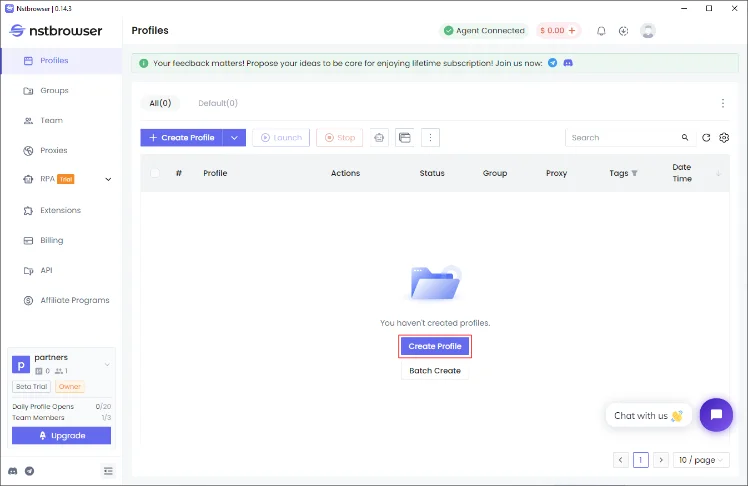
Step 1: Establish a New Browser Profile

Initiate a new browser profile in Nstbrowser by clicking the "Create profile" button, which leads you to the profile creation settings.
Step 2: Set Up Your AstroProxy

AstroProxy presents 4 proxy options: Residential, Mobile and Datacenter. Choose your preferred proxy type and configure its settings on the AstroProxy dashboard.
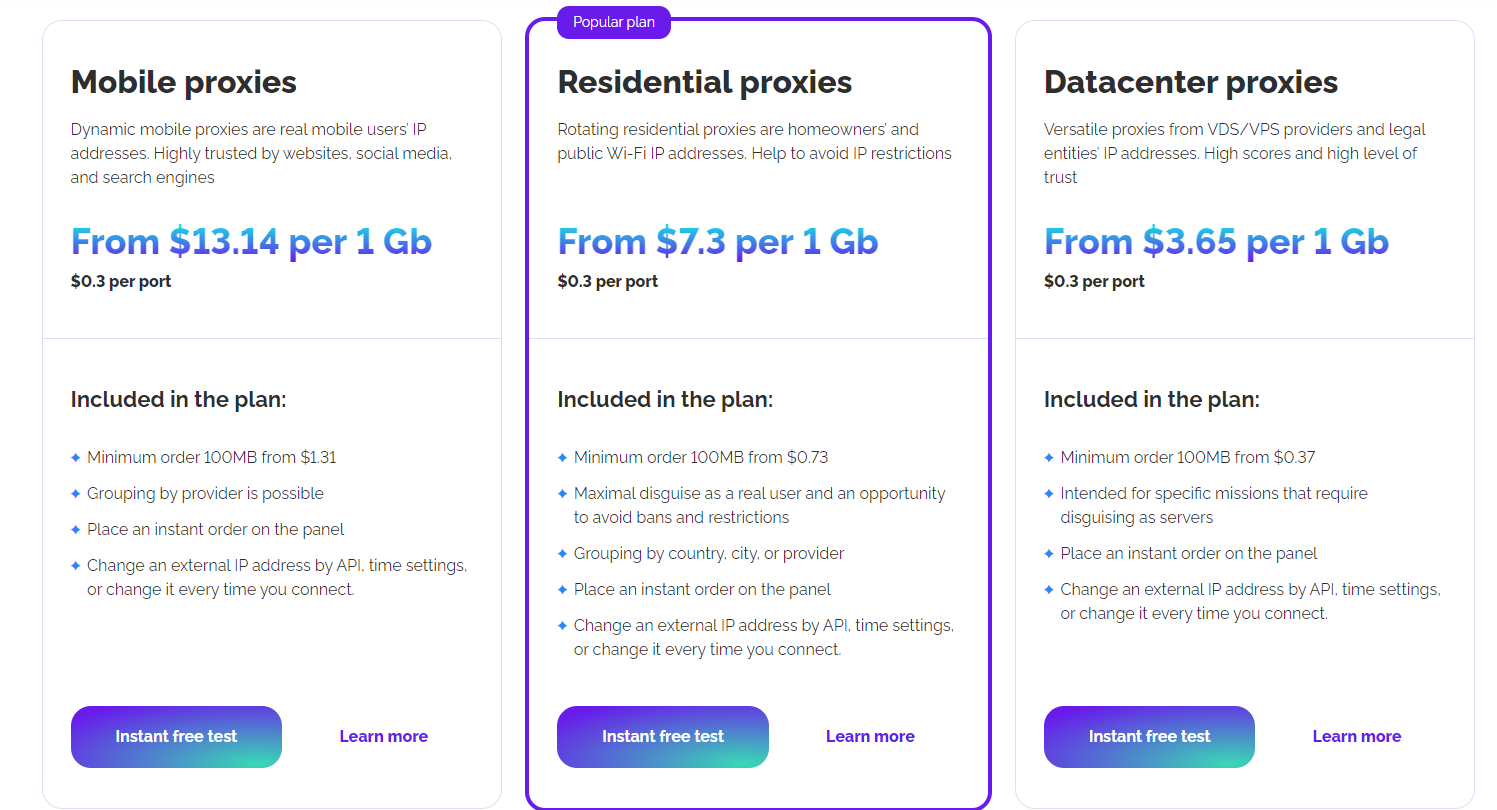
AstroProxy types of proxies

Once we are registered, on the dashboard, click add port

alt text
, in this example, we select Residential, in this menu you will be able to adjust your settings accordingly.
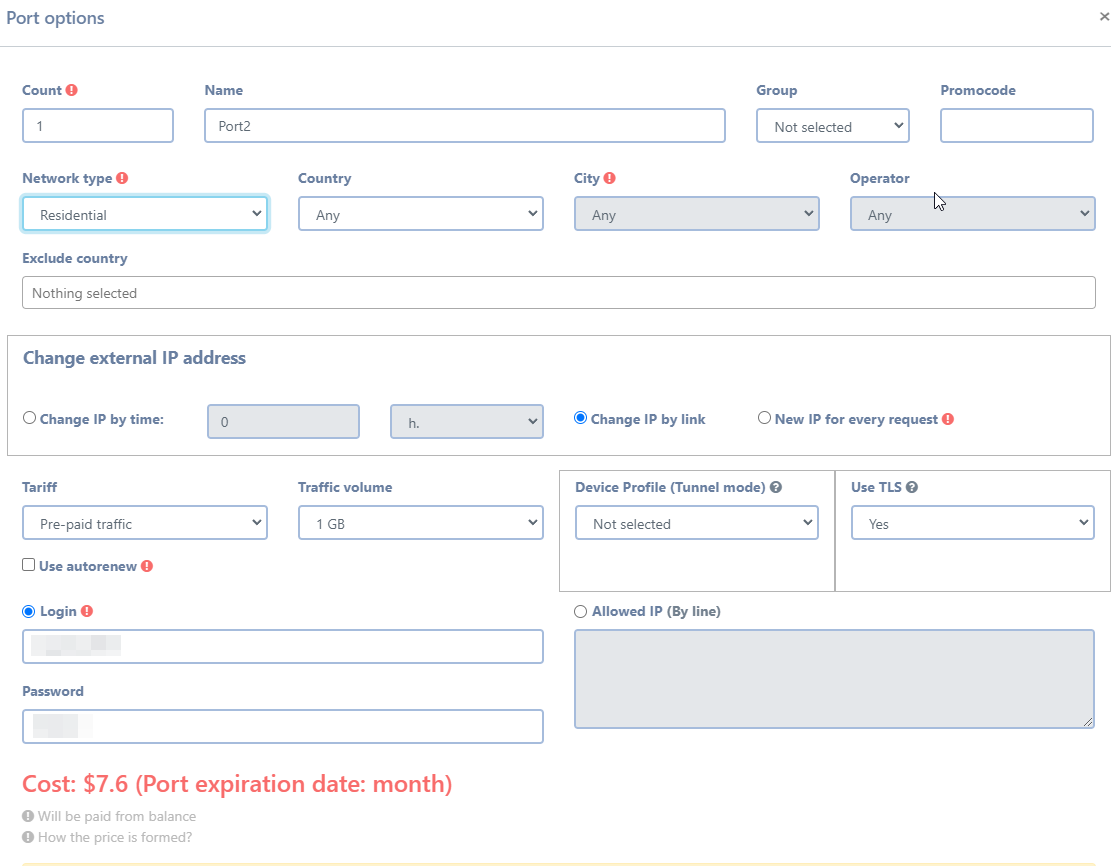
Proxy settings dashboard

After configuration, proceed to copy the proxy details from the formatted proxy list panel.
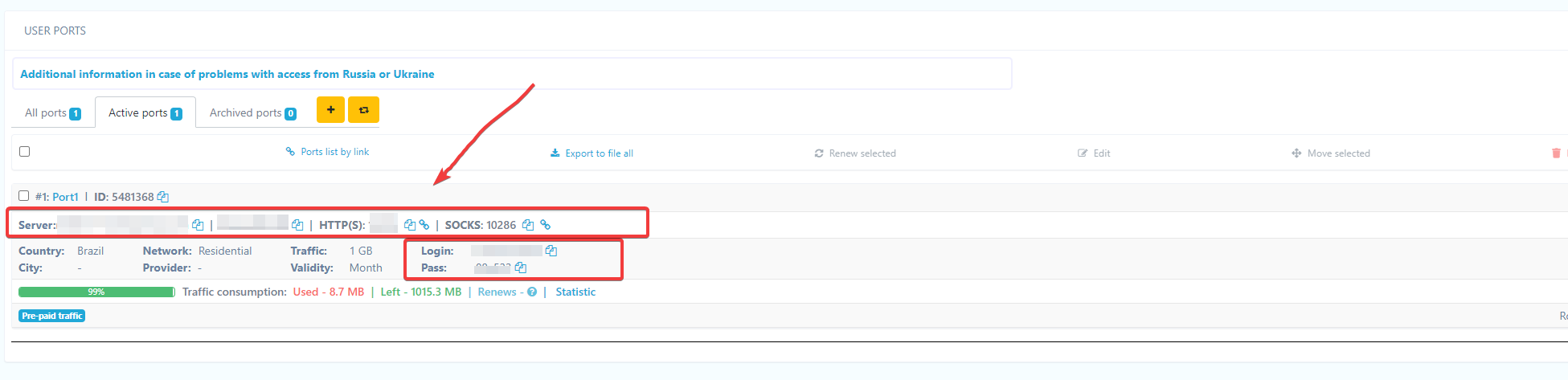
Copy proxy details

Step 3: Enter Your Proxy Details

Navigate to the "Proxy" tab in Nstbrowser and select "Custom" under proxy settings. Here, you can insert your AstroProxy proxy details by pasting the proxy URI from the AstroProxy dashboard into the "Proxy URL" field, select your desired protocol, and conduct a test. Confirm by clicking "Create profile".
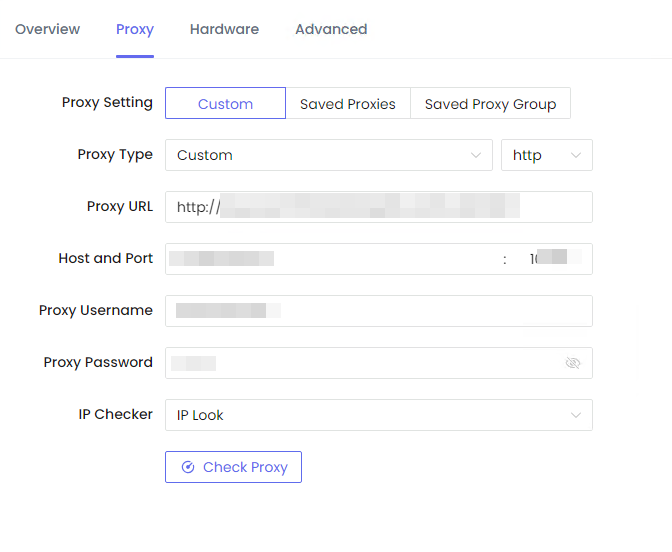
Enter proxy details into Nstbrowser

Step 4: Activate Your Profile

To activate your newly created profile, press the "Play" button. Nstbrowser will download the necessary kernel, allowing you to start browsing anonymously and securely.

Activate new profile
More
Apache IP Ban: How to Bypass Fail2Ban and Rate Limits with Nstbrowser
Browser FingerprintProxy
Apache IP Ban: How to Bypass Fail2Ban and Rate Limits with Nstbrowser
Learn how Apache's security tools like Fail2Ban trigger IP bans and how Nstbrowser's advanced digital fingerprinting and proxy management ensure undetectable access for web scraping and multi-account management.
Dec 09, 2025Robin Brown
 Drupal IP Ban: How Professional Users Bypass Rate Limiting with Nstbrowser
ProxyBrowser Fingerprint
Drupal IP Ban: How Professional Users Bypass Rate Limiting with Nstbrowser
Learn how Drupal's aggressive IP ban and digital fingerprinting systems work. Discover how Nstbrowser provides an undetectable solution for web scraping and competitive intelligence. **Keywords:** Drupal IP ban, Nstbrowser, antidetect browser, web scraping, digital fingerprinting, rate limiting, Drupal security.
Dec 09, 2025Triệu Lệ Chi
8 Best Whoer Alternatives in 2025: Accurate & Private IP Check Tools with Nstbrowser
Headless BrowserProxy
8 Best Whoer Alternatives in 2025: Accurate & Private IP Check Tools with Nstbrowser
Looking for Whoer.net alternatives? Discover the 8 best IP and browser fingerprinting tools in 2025 and learn how to achieve true online privacy and multi-account management with the Nstbrowser anti-detect browser.
Dec 08, 2025Robin Brown
How to Check Residential Proxy: Complete Guide to Proxy Quality Verification 2026
Proxy
How to Check Residential Proxy: Complete Guide to Proxy Quality Verification 2026
Verify residential proxy quality before deployment. Learn proxy testing methods for speed, anonymity, and detection risk. Discover tools like Pixelscan and IP databases for comprehensive proxy verification and integration with Nstbrowser.
Dec 03, 2025Robin Brown
BlockAway Proxy: A Comprehensive Guide to Features, Benefits, and Usage
Proxy
BlockAway Proxy: A Comprehensive Guide to Features, Benefits, and Usage
Learn how BlockAway Proxy provides free anonymous browsing, IP masking, and geo-restriction bypass. Explore features, compare to VPNs and other proxies, and discover integration with Nstbrowser for multi-account privacy management.
Dec 02, 2025Robin Brown
TikTok Banned? Backup Content, Move Platforms, Protect
ProxyBrowser Fingerprint
TikTok Banned? Backup Content, Move Platforms, Protect
Learn the urgent steps to take if TikTok is banned: how to back up your content, the best alternative platforms (YouTube, Instagram, Facebook), and how Nstbrowser Antidetect Browser secures your multi-platform presence and audience.
Nov 27, 2025Robin Brown
Catalogue